
Make your font manually: free & traced from your own handwriting
Print a template, write every character yourself, photograph the pages and upload them. What comes back is a real, installable font exactly as you drew it.
Set aside 6–8 hours from printing to the finished font. Completely free.
How to make your font manually
In 4 manual steps
-
Print the template
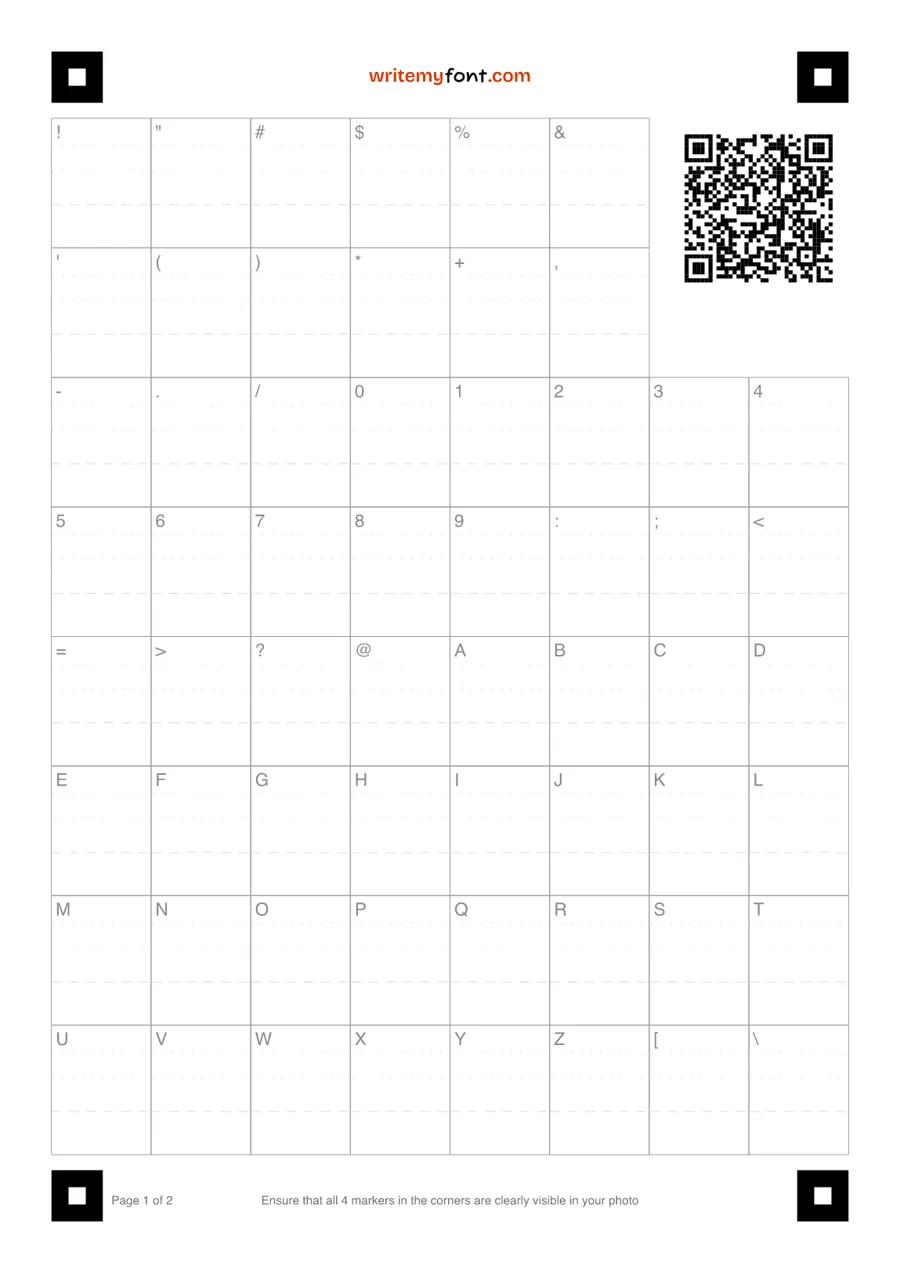
Choose the character sets you want and print the PDF on plain white paper. The English set is two A4 pages.
-
Write one character in each box
Use a dark pen and write the way you normally write. Each box is labelled with the character it asks for, and the dashed lines show where the baseline sits.
-
Photograph the pages
Lay each page flat in even light and take a photo with your phone, with all four corner squares in the picture. No scanner needed.
-
Upload, adjust, download
Upload the photos, and your font is built. Redraw any character or nudge the spacings, then download TTF, OTF and WOFF.
What you get
- 100 characters as standard. Upper and lower case A–Z, numbers, punctuation and symbols including curly quotes, plus the euro (€) and pound (£) signs. They are on every template.
- Up to 160 with accented letters. Before you print, add the accented letters and punctuation marks for Spanish, French, German, Portuguese and Italian. Add one language or all five.
- Three formats, one weight. Your font comes as TTF, OTF and WOFF in Regular weight, with no watermark. It installs on Windows, macOS, Linux, iOS and Android.
- Every character is yours. Each glyph is traced from the ink you put in its box. Your font includes every character you fill in.
- As many as you like. There is no limit on how many Manual fonts one person makes. Print another set for a second style, or for someone else's handwriting.
- Yours to keep and use. A perpetual licence for personal and commercial work, with nothing more to pay.
No printer, or short on time?
An Automatic font needs one photo of a sentence or two in your handwriting, and is ready in about 2 minutes.
Create Automatic fontReady in 2 mins
Manual font questions
Does a Manual font really cost nothing?
Yes. Printing the template, uploading the pages, editing the characters and downloading the TTF, OTF and WOFF files are all free, and there is no watermark and no limit on how many you make. The paid product on this site is the Automatic font, which is a separate thing: one photo, about 2 minutes, $8.99 to download after a free preview.
How long does it take?
Set aside 6–8 hours from printing to the finished font. Most of that is writing: 100 characters, each in its own box, and more if you add languages. Photographing and uploading take minutes, and adjusting characters afterwards is up to you.
Do I need an account?
Not to print. Choose your character sets and download the PDF without signing in. When you upload the filled pages you sign in with Google, so your font is saved and you can come back to it.
What should I write with, and on what?
A dark pen, on the template printed on plain white paper. Write one character in each box, the way you normally write it. Light ink traces thin, so a black or dark blue pen gives the cleanest result.
Which characters and languages can it include?
Every template covers the full English set of 100 characters: upper and lower case A–Z, numbers, punctuation and symbols including curly quotes, plus the euro and pound signs. Before you print, you can add the accented letters and punctuation marks for Spanish, French, German, Portuguese and Italian, up to 160 characters in all. Languages outside those five are not offered yet.
What if a character comes out wrong?
Fix it without reprinting. In the editor you can redraw any character, adjust its spacing, or re-photograph a single page and upload it again. Your font is rebuilt each time.
Does it work with a phone photo?
Yes, a phone photo is all it needs. Lay the page flat, keep it in focus in even light, and make sure all four corner squares are in the picture. Upload the pages in any order.
How is a Manual font different from an Automatic font?
A Manual font is every character written by you in a printed template, takes 6–8 hours, comes in one weight and costs nothing. An Automatic font is made from one photo of a sentence or two, takes about 2 minutes, comes in Regular, Medium and Bold, and costs $8.99 to download after a free preview. Both are real, installable fonts that are yours to keep. How each one works.
Can I make a font of someone else's handwriting?
If they can fill in the template, yes: print a set for them and upload their pages. Handwriting that already exists, such as old letters or a card, cannot be put on a template; for that, photograph it and make an Automatic font.
Where can I use the font?
Anywhere your device lets you choose a font: Word, Pages, PowerPoint, Canva, Photoshop, Notion, your notes and your email. On iPad, install it with an app such as AnyFont and write in apps like GoodNotes.
Start with the template
Print it today, write it in your own time, and upload it when it is done.
Create Manual font