
Make your own fontfrom handwriting
Two ways to create your handwriting font

Create automatically
Takes 2 mins
- Write 1–2 sentences on any paper
- Upload the photo
- Your font is ready in 2 mins
Free preview. $8.99 to download.
Create manually
Takes 6–8 hours
- Print the PDF template
- Write each character (100+) in its box
- Upload the page photos
- Manually adjust spacings
Completely free
Automatically create your font
From photo to font in about 2 mins
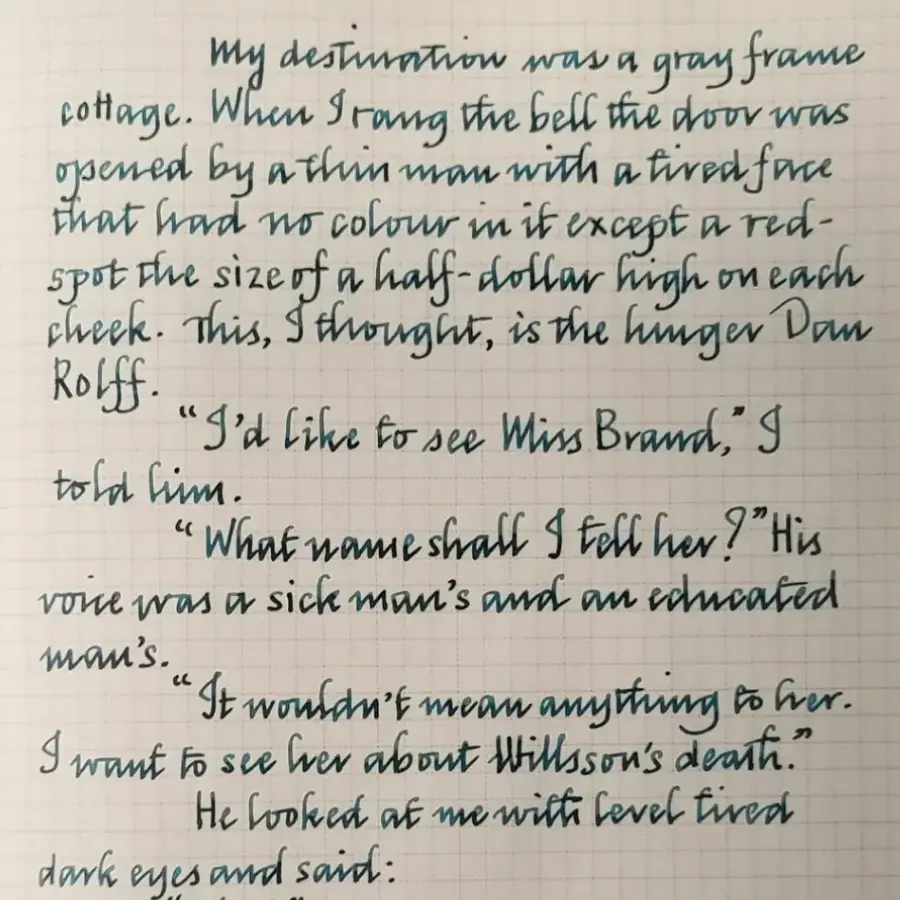
Add personality to everything you type

Keep a handwriting forever
Digitize your kid's childhood scribbles or a loved one's words into a font your family can cherish forever
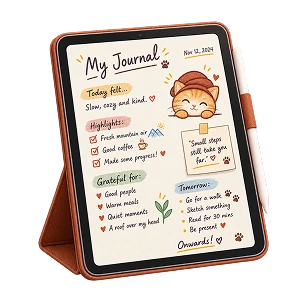
Journals that feel like you
Planners, scrapbooks and notes keep the warmth of your handwriting, with all the character and personality
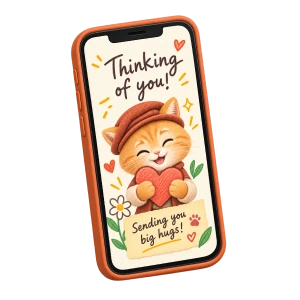
Cards that feel handwritten
Birthday wishes, thank-yous and love notes as personal as your pen, warmer than any font and always easy to read

Invitations worth keeping
Wedding invites, place cards and gift tags in your own handwriting, with all the charm minus the wrist cramps
Two ways. No subscriptions.
Pay once for an Automatic font, or make a Manual font from a printed template.
-
Yours foreverNo subscriptions, no renewals
-
Multiple formatsTTF, OTF, and WOFF
-
Works everywhereComputers, phones, and tablets

Automatic font
$8.99
one-time
- Just one photo of your handwriting
- Ready in about 2 mins
- Missing letters follow your style
- Accented letters drawn for you
- Regular, Medium and Bold weights
- Free preview before you pay
Not happy? We'll customize your font for you.
Manual font
$0
Free
- Print the template and fill in 100+ letters
- Takes you about 6–8 hours
- Missing letters will be absent
- Accents mean more boxes to fill
- Regular font weight only
- No automatic spacings
Frequently asked questions
Will my font actually look like my real handwriting?
Yes — that's the whole point, whichever way you make it. An Automatic font reads your handwriting from the photo you upload and draws a complete, consistent set in your style. A Manual font is traced from the ink of every character you write on the template.
Do I have to write out every letter, or fill in a template?
Not for an Automatic font. Just write a sentence or two the way you normally write, snap a photo, and we read your letterforms from that. Any characters you didn't write — capitals, numbers, punctuation, accented letters — are drawn to match your style, so the whole alphabet still feels like you. If you'd rather write every character yourself, the Manual font is made from a template you print and fill in.
What should I write for an Automatic font, and what kind of handwriting works best?
A few natural sentences in any language written with the Latin alphabet, in your regular handwriting, in good light, all in one consistent style. The more relaxed and natural your writing, the more the font feels authentically yours.
What characters does an Automatic font include?
Upper and lower case A–Z, the numbers 0–9, the punctuation and symbols on a standard keyboard, the euro and pound signs, and the accented letters and marks used in Spanish, French, German, Portuguese and Italian. The preview is free, so you can type the words you care about and see how they look before you pay.
Is there a free option?
Yes — the Manual font. Print the template, fill in each box with a dark pen, photograph the pages with your phone and upload them. Every character is traced from your own ink, and you download the finished font as TTF, OTF and WOFF files without paying anything. More about the Manual font.
How do I fill in the Manual font template?
Print the template and write one character in each box with a dark pen. Photograph each page flat, in even light, with all four corner squares in the picture, then upload the photos in any order. Printing needs no account; you sign in with Google when you upload, so your font is saved for you.
What characters and languages can a Manual font include?
Every template covers the full English set — upper and lower case A–Z, numbers, punctuation and symbols, including curly quotes — plus the euro (€) and pound (£) signs: 100 characters. Before you print, you can add the accented letters and punctuation marks for Spanish, French, German, Portuguese and Italian, up to 160 characters in all. Your font includes every character you fill in.
Which one looks most like my handwriting?
A Manual font is traced from the ink of every character you write, so each letter is exactly as you drew it. An Automatic font reads your handwriting from one photo and draws a complete, consistent set in your style, including the characters you didn't write. The Automatic font's preview is free, so you can type with it and judge it with your own eyes before you pay. How each one works.
Does this work with Chinese, Arabic or other non-Latin handwriting?
Not yet. Write My Font works with the Latin alphabet only, so handwriting in Chinese, Japanese, Korean, Arabic, Hebrew, Devanagari, Cyrillic, Thai or any other script won't produce a usable font — please don't upload it.
Will a photo from my phone work?
Absolutely — a phone photo is all you need. Lay the page flat, and keep it in focus with clear lighting. No scanner and no special app: the clearer the photo, the crisper your font.
Can I try it before I pay?
Yes. Upload your handwriting and we'll generate a free preview of your Automatic font you can type with right on the page. You only pay when you're ready to download it. A Manual font costs nothing from start to finish.
How much does it cost? Is there a subscription?
An Automatic font is one flat $8.99, paid once. A Manual font costs nothing. No subscription, no renewals, no hidden fees — your font is yours to keep and use forever. Most font creation tools charge you every month; we don't.
What files will I receive?
An Automatic font is a single ZIP with nine files: Regular, Medium and Bold weights, each in TTF, OTF and WOFF format. A Manual font is a ZIP with three: one weight, in the same three formats. Either one installs and works on Windows, macOS, Linux, iOS and Android — desktops, laptops, phones and tablets alike.
How do I install my font?
On Windows or macOS, open the file and click "Install." On iPhone or iPad, use a free app like AnyFont; on Android, use iFont or a similar font manager. It takes under a minute, and then your handwriting shows up wherever you pick fonts.
Where can I use my font?
Anywhere your device lets you choose a font — Microsoft Word, Pages, PowerPoint, Canva, Photoshop, Notion, your notes and your email. On iPad, install it with AnyFont and write in apps like GoodNotes. (A few web-only editors such as Google Docs only allow their own font library — a limitation of those apps, not your font.)
Can I use my font commercially? Do I own it?
Yes to both. The font you generate is yours, with a perpetual license to use it for anything — personal projects, journals and cards, business branding, or paid client work — with no royalties and nothing more to pay.
What payment methods do you accept?
All major credit and debit cards, handled securely by our payment provider. Your card number and security code never touch our servers.
What if I'm not happy with my font?
Email us at help@writemyfont.com. For an Automatic font, we'll regenerate or customize it at no additional charge. For a Manual font, you can also re-photograph a page or redraw any character yourself at any time.
About Write My Font
Write My Font (writemyfont.com) is an online tool that turns handwriting into installable fonts. It makes two things: an Automatic font from one photo of your handwriting, and a Manual font traced from a printed template you fill in. How each one works.
It is an independent tool and not related or affiliated to any other tools or open-source repositories that use similar sounding names or domains.
Now do it with yours
One photo of your handwriting is all it takes.
Upload handwriting photo